

Cloud services have become an essential part of our daily lives, from boardrooms to living rooms. Thanks to the centralization of computing and mass storage, users can now enjoy the mobility and convenience of smaller devices like laptops and smartphones, while still enjoying the benefits of server-grade hardware. Modern offices rely heavily on cloud storage and applications provided by cloud services like Microsoft’s O365. Cloud computing has also enabled remote work through secure remote desktop applications like Citrix. Outside of the office, cloud services such as Netflix offer a vast collection of video content, while newer cloud gaming services like GeForce Now provide high-quality gaming streamed directly to your device. That being said, cloud computing has some drawbacks we need to consider, and let’s explore how we can potentially create our own cloud services to overcome the current model of cloud computing.
What is Cloud Computing?
Cloud Computing’s key components
Cloud computing is a game-changing process that enables low-powered devices to connect to a central computing unit, known as a “cloud service”, that empowers them to perform operations that would have been impossible otherwise. This means that various end devices, such as phones, smartwatches, laptops, and even cars, can connect to a network and potentially leverage the power of a cloud service. According to Google Cloud’s article, “What is cloud architecture”, the four components of cloud infrastructure are frontend platforms, backend platforms, delivery models, and a network. Frontend platforms consist of a user’s devices and the application they use to connect to the host. The backend platform comprises everything required to provide the services a user needs, from the hardware performing computational tasks to the vast array of storage needed, the software the client is accessing, and the middleware that manages the font end’s connection.
Now that we have a good understanding of the frontend and backend components, it’s important to discuss the crucial factor that enables their communication: the network. According to Jannik Linder’s article on “Must-Know Internet Traffic Statistics,” monthly internet traffic reached approximately a staggering 151 exabytes in 2023 – that’s equivalent to 151 billion gigabytes! Interestingly, approximately sixty percent of this traffic is attributed to video on demand, a popular cloud service. While other cloud services lack thorough documentation, it’s clear that over half of all web traffic is generated by cloud services. Having explored the main physical components of cloud computing, we can now move on to a deeper analysis of the various delivery models.
Delivery Models
As we discussed previously the final component of cloud computing is the delivery model. There are three delivery models Infrastructure as a Service (IaaS), Platform as a Service (PaaS), and Software as a Service (SaaS) (Google, 2024). According to Stephanie Susnjara and Ian Smalley in their article, “What is cloud computing” on IBM’s website Infrastructure as a Service provides instant access to computing power as needed. This can involve anything from virtual desktops to large storage pools, and allows a client to scale as the need arises. They also point out that IaaS is a $212.34 billion industry that is projected to grow another 14.2% by 2028. Common IaaS programs you may be familiar with are Citrix Virtual Desktop, Microsoft Azure, and Digital Ocean.
Next, they explain Platform as a Service as, “…an on-demand platform-hardware, complete software stack, infrastructure, and development tools… for developing and managing applications.” (Susnmjara. Smalley, 2024). Essentially, these services provide companies with everything a data center has to offer without the need for expensive equipment costs upfront. They go on to explain that these services rely on containers, a form of virtualization, to enable developers to scale as the project grows without the changes needed for the middleware we discussed earlier. Common PaaS technologies you may have heard about include Docker, something we will delve into later, and Kubernetes.
The final delivery method is by far the most common one for the average consumer, Software as a Service. Products such as iCloud, Netflix, and Google Drive are all examples of common SaaS platforms. SaaS offers remote storage, automated patching, and instant access to resources, and uses API calls that are integrated into the end-user application to push or pull data. Susanmjara and Smalley point out that this is the largest segment of cloud computing accounting generating approximately $359 billion in global revenue.
Benefits
Now that we have defined the key components of cloud computing, let’s discuss what the benefits of cloud computing are. The first and most obvious advantage is the low barrier to entry. With a steady internet connection even the thinnest of clients can have the processing power of a high-end machine. Resources such as processing, storage, and memory are offloaded onto the remote ecosystem of machines. A worker can log in remotely from a lightweight laptop, like a MacBook Air, and utilize cloud services to perform various tasks. They can create and edit videos, write code, and collaborate with colleagues from different parts of the world. All this can be done while sitting in their favorite café and sipping on their favorite beverage. After a long day of work, a MacBook Air can serve as a gateway to a vast collection of videos or high-end gaming without requiring the user to invest in additional storage or gaming equipment. This makes the hardware more lightweight and efficient, giving the average user greater flexibility to pursue their interests.
Next, let’s talk about money. How much can cloud computing save your organization every year? According to Jannik Lindner, co-founder of Gitnux a market research firm, in his article “Must-Know Cloud Cost Savings Statistics” companies save about twenty percent on infrastructure costs annually by switching to cloud computing products. Additionally, companies save between thirty and sixty percent on energy bills per month. He also states that on average, companies save thirty-seven percent on new hardware acquisition for employees. Along with the savings he says IT departments reported newer company initiatives take less than half the time to deploy, and a sixty percent increase in data processing.
Finally, let’s cover the flexibility of on-demand models. Digital Ocean defines the benefits of cloud scalability in the post, “What is cloud scalability?” as “… the capacity of a cloud computing environment to effectively handle growing or diminishing workloads by proportionally adjusting its resource footprint.”, and that it pertains to the long-term demands to meet the needs of the client exactly. Additionally, they discuss the elasticity of cloud services. In short, elasticity is quick short-term increases in workload demands. Elasticity allows for instant resource availability creation to maintain performance consistency without the long-term commitment of an agreement for scalability. For example, I used to work at a law firm where we utilized cloud storage services and document management systems for our attorneys and legal assistants. We contracted for exactly the number of lawyers and legal assistants with a little extra and when we had guest attorneys for certain cases, that could last weeks to months, we could easily add a temporary Azure and Box account at different rates and then drop them as the case closed. With the benefits of increased freedom, financial savings, and easy growth and stability, what are the risks of relying on cloud computing?
Risks of Relying on Cloud Computing
Cyber-security incidents
While cloud computing provides several advantages, it also poses some significant limitations, particularly concerning security risks that come with depending on remote services. Despite your adherence to best data practices, the third-party cloud service you utilize may not follow suit. As an example, the Equifax breach in 2017 exposed the social security numbers of over two-thirds of Americans, mainly due to delayed security patching and storing of credentials in plain text (Cooney, 2018).
In 2014, there was a major security breach on iCloud which resulted in the exposure of private photos and videos of several celebrities. Similarly, in 2020, a similar attack targeted Amazon Web Services (AWS) and involved rootkit malware. According to Emanuella Gringberg from CNN, the iCloud hack was carried out by a group of cybercriminals who used spear phishing to target around 250 celebrity accounts. They sent phishing emails that appeared to be from Apple’s security team, tricking users into giving away their login credentials. Since Apple didn’t have multifactor authentication at that time, the hackers were able to gain access to private and explicit photos, which they then sold on the internet. However, the latest attack on AWS was even more sophisticated.
In 2020, a group of hackers conducted a sophisticated attack on Amazon Web Services platforms, known as rootkit. As a result of this attack, the hackers implanted malware that granted them root access, which enabled them to infiltrate the C2 control node. This access allowed them to view and duplicate the containers of numerous clients who were utilizing AWS cloud services. While there was no indication as to how long the hackers had access to the system or the method of attack, the unauthorized activity was identified during a review of networking logs (Pell, 2020). This incident underscores the fact that cloud computing services have become a prime target for hackers. Given the rising costs associated with these services, one may question if the benefits outweigh the risks.
Price Increases
In today’s economic climate, the cost of goods and services seems to be on the rise, including cloud computing services. Consider, for example, media-on-demand streaming services like Netflix and Spotify, which are the largest platforms in their respective categories. As reported by Emma Roth at the Verge, in 2011, the standard plan for Netflix began at $7.99 per month and has since increased to $15.49 per month, almost double the original price. Additionally, features like screen sharing and account sharing have been limited over time. Similarly, according to Ashley Capoot at CNBC, Spotify increased its prices by twenty percent in 2022. What are the reasons for the price increase? Is it inflation, slowing user growth, greed, or all the above?
First, let’s examine inflation. According to the U.S. Bureau of Labor Statistics, from 2011 to 2024, inflation was 2.55% year on year. If we do the calculations, $7.99 in 2011 currency value is worth $14.08 in 2024. Therefore, $1.41 of Netflix’s price increase is not due to inflation. Although not as significant, Spotify’s price increase exceeds inflation by seventeen cents. In their article “The cheap streaming era is over. Here’s why your bills are going up”, Wendy Lee and Thomas Lauder from the LA Times investigate the business practices of cloud streaming services. They note that between 2022 and 2024, the top ten streaming platforms raised prices by twenty percent. While inflation is partially to blame, other factors are also at play, such as market saturation, a decline in subscribers, and the infrastructure monopoly of the big three: Amazon, Microsoft, and Google. These companies are attempting to maintain profitability. As a result, consumers may have to budget for price hikes every few years in the foreseeable future. However, the potential end of cloud services due to various reasons may be a more significant concern.
Termination of Services
While never ending prices sound bad many cloud services have appeared and disappeared in a blink of an eye. You need only look to Google to find a list of defunct cloud solutions. On the website killedbygoogle.com, you can see a list of every service Google shut down and how long it was around. For example, cloud services such as Google Cloud IoT Core and Stadia hardly made it a few years before Google closed the curtains on them. Stadia was a service I used as it offered a means to game anywhere at any time. In the end, I lost all of the games that I purchased, the progress in said games, and the sixty-dollar controller is now an inert paperweight.
While businesses have the prerogative to shut down if they can no longer sustain their operations, what recourse does a consumer have when they’re unjustly accused and barred from using a company’s services? Take the case of Brandon Jackson, who was denied access to his Amazon smart home devices after a driver alleged that his Ring doorbell had uttered a racial slur. However, upon reviewing the security footage, Brandon found that only the preset greeting had been activated. Despite providing the video evidence, he and his loved ones were still denied access for several weeks, as reported by Emily Crane of the New York Post.
As you may have noticed, there are some significant disadvantages to depending on cloud services. While it may be cost-effective, not having ownership of your data or the drive it’s stored on puts you at the mercy of third parties. Furthermore, prices for these services are likely to increase, and the industry may become monopolized. Criticizing subscription-based models and Software as a Service, economist Ida Auken once said, “You will own nothing and you’ll be happy.”. This statement seems less like a dystopian joke and more like a potential reality.
Cloud Computing’s Impact on the Environment
Cloud Computing Energy Consumption
Now, let’s turn our attention to the environmental impact of the data centers that are essential for supporting cloud services. To begin, we must consider the significant amount of electricity required to keep online services running. According to the Department of Energy’s Office of Energy Efficiency & Renewable Energy, data centers account for two percent of the national electrical demand and are up to fifty times more energy-intensive than an average commercial space. While this may appear insignificant, a case study by MIT’s Steven Monserrate titled “The Cloud Is Material: On the Environmental Impacts of Computation and Data Storage” reveals that the collective impact of cloud computing creates more emissions than most industries globally. Steven also estimates that a single data center uses the same amount of electricity as fifty-thousand houses annually. Shockingly, over forty percent of this energy is wasted on cooling densely packed server stacks, while only six to twelve percent is actually used for computational tasks. Now that we understand the energy demands of these data centers, let’s explore how this energy is generated.
Understanding how energy is produced is crucial to grasping the impact of the growing electrical demand. In 2021, burning fossil fuels accounted for about sixty-one percent of energy generation, resulting in thirty-seven out of forty billion tons of carbon dioxide emissions released into the atmosphere (Statista, 2023; Stanford, 2023). As previously mentioned, cloud computing’s energy demand contributed to two percent of global CO2 emissions (Monserrate, 2023), which translates to cloud services producing 740 million tons of CO2. Unfortunately, more than half of that amount is used solely for cooling the servers that power backend services. It’s ironic that to cool our servers, we must contribute to the warming of our planet.
Water Demands
Data centers require a constant flow of fresh water to cool their systems, much like a living organism needs water to survive. Monserrate writes about the National Security Agency data center in Arizona, comparing the vast water cooling systems to an irrigated farm. These data centers can consume up to seven million gallons of fresh water every day. Monserrate points out that according to the United Nations 2021 Gap Report, fresh water will become a scarce resource by 2040. As water becomes less accessible, data centers will need to adapt to maintain optimal thermal conditions.
E-Waste
While the consumption requirements of natural resources to power and cool cloud computing hardware are alarming, arguably the legacy of data centers’ impact on the environment will be the never-ending stream of electronic waste. Globally we produce up to twenty-five million tons of electronic waste annually (Khalid Hassan,2023). The average life span of all electronics is on average just two years, and since most of the parts are not recycled they end up in rotting away in vast landfills (Monserrate,2023). Most devices contain plastics that can take up to 1,500 years to break down and additionally contain heavy metals such as cadmium, lead, and mercury that can be radioactive and can cause irreversible damage to the soil, water resources, and the local population (Khalid Hassan,2023). Though cloud computing offers a vast array of benefits, it comes at a staggering cost, but what if there was a way to overcome some of these drawbacks and gain more control over your cloud services? In the next section, we will discuss a possible solution to the drawbacks of data center driven cloud services.
Local Hosting
In this post, we have explored how cloud services have become a necessity in modern life. However, they have some drawbacks in terms of security, control, and their impact on the environment. Local hosting, on the other hand, provides the same services, but instead of relying on centralized data centers, the services are configured and run on your hardware. There are many applications available to replace popular apps. For instance, applications like Plex or Jellyfin aim to reduce your reliance on the ever-changing library of streaming services like Netflix or Hulu. You can build and share your private library of movies and TV shows on your home server with friends and family. If you want to consolidate all your IoT devices under one app that will always work even in an internet outage, then Home Assistant can be easily deployed in a lightweight docker container and locally manage all of your lights, locks, and more. Are you tired of paying exorbitant prices for Adobe Cloud or Google Drive? Then Nextcloud is a quick way to turn your old desktop into a shared drive that you can access from anywhere in the globe. We could go on and on about open-source local cloud services that one can configure and deploy, but it’s clear that any cloud-based need could potentially be met by a home do-it-yourself solution.
Benefits
Hosting your cloud applications locally can have many benefits, including saving you money in the long run. For instance, in 2023, the average American spent around $219 on online subscriptions, mainly on online storage, music streaming, and video on demand (Dias, 2023). This amounts to thousands of dollars in recurring charges for cloud services every year. So, how can we start hosting our own services?
The first step is usually the most expensive one, which involves acquiring hardware. I used a refurbished tower from Goodwill, fitted with a second-hand motherboard, processor, Nvidia graphics card, RAM, and ten terabytes of storage, which cost me roughly $800 to source. Additionally, I pay $12 a year for a domain name to make it easier for me to find my services. After assembling the hardware, the next potential cost would be an operating system license if you’re using Windows Server. However, I opted for Ubuntu server, a Linux distribution, to save on cost. If you’re looking for an even cheaper option, you can run most cloud applications off small credit card-sized computers, such as the Raspberry Pi, for less than $100. Finally, the best option is the free one: dust off that old laptop or desktop and turn it into a server in no time! Once you set up your server there are no recurring charges as you own the entire system in its entirety saving you potentially thousands a year.
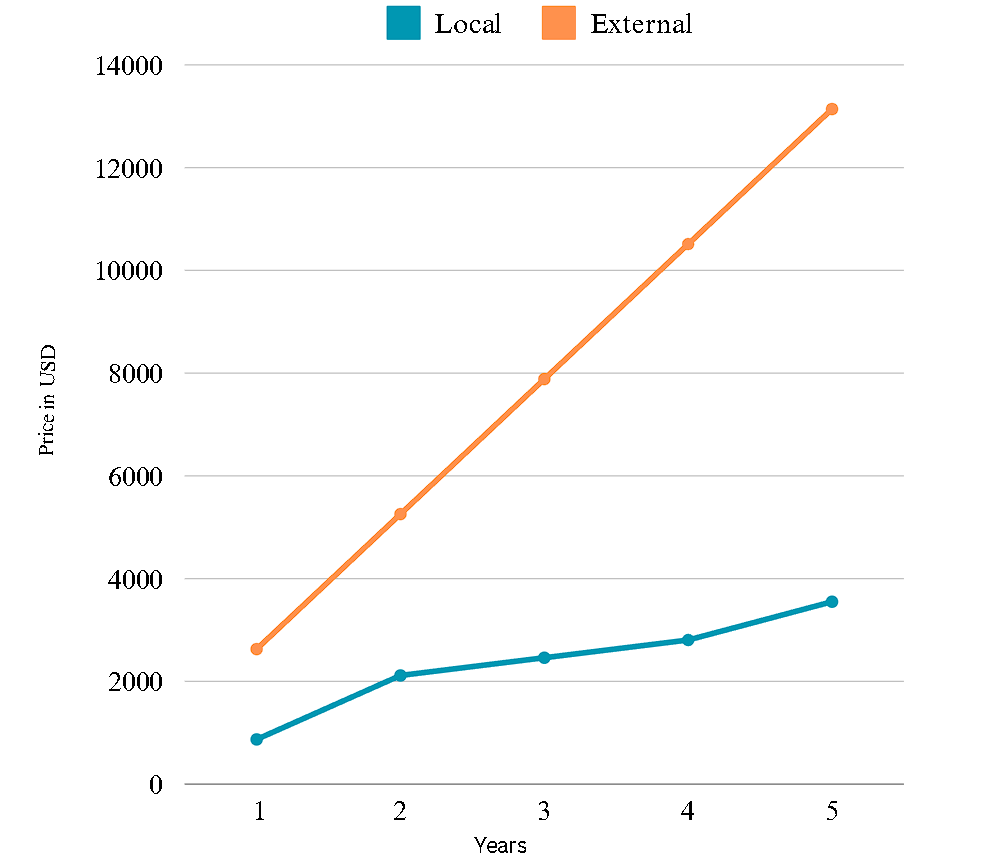
Not only does locally hosting your cloud services save you money, but it also benefits the environment. Compact systems like a Raspberry Pi or a recycled server consume significantly less power than their data center counterparts. For instance, a single board arm computer can consume as little as 10 Watts! In my case, my server consumed an average of 374 Watts an hour, which means I only spent $327.85 a year on electricity at OPPD’s rate of 10 cents per kilowatt hour. In contrast, a single server rack in a data center can consume several thousand Watts an hour (Monteclaro, 2023). By hosting locally, we can prevent used parts from ending up in a landfill and save money in the process. Figure 1 illustrates the anticipated expenses over the next five years, with the first year encompassing the estimated cost of building a server like mine and the electricity required to operate it. The following years include the expenses of electricity and domain renewal, while the final year includes the cost of electricity, domain renewal, and an additional $500 for server maintenance. Compare these costs to the typical monthly expenses of an average American and see the savings that can be achieved.
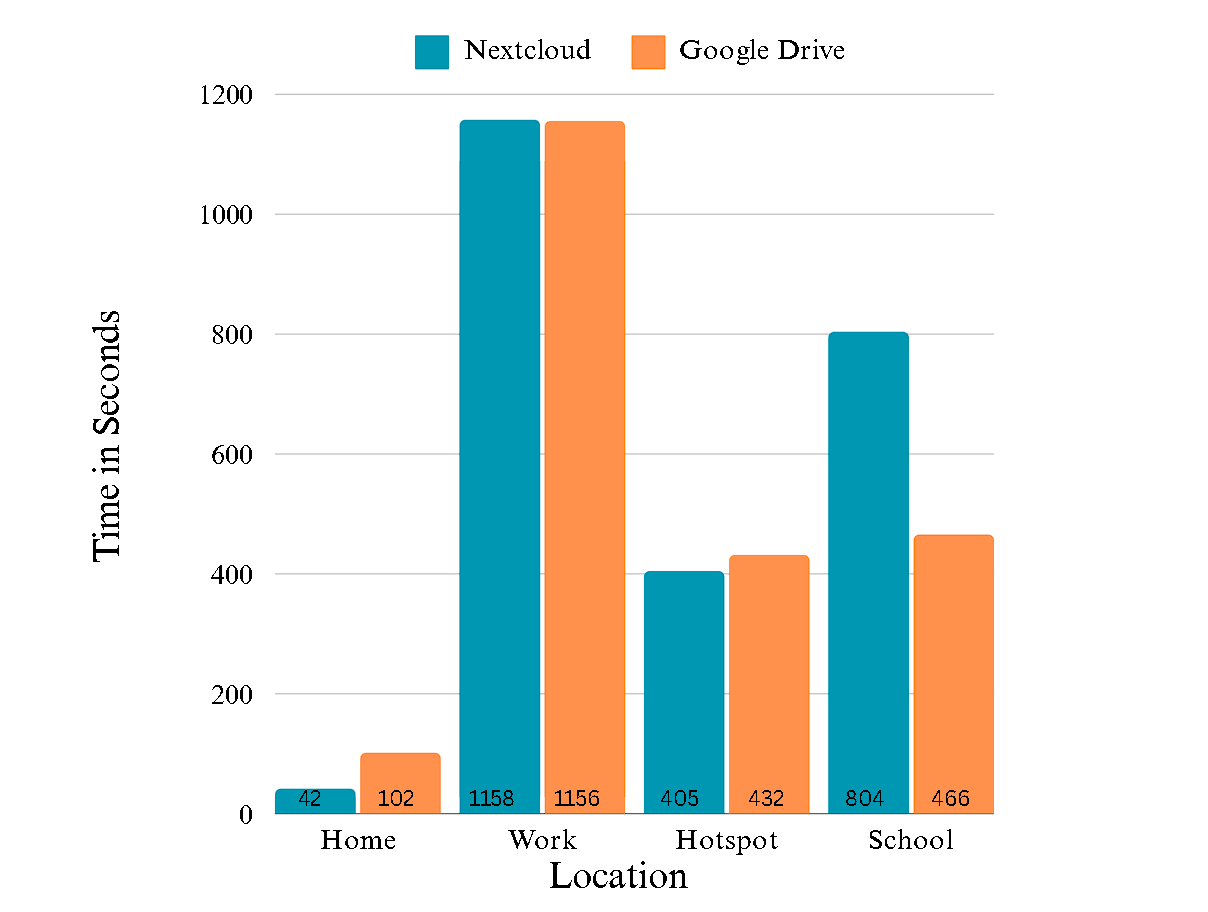
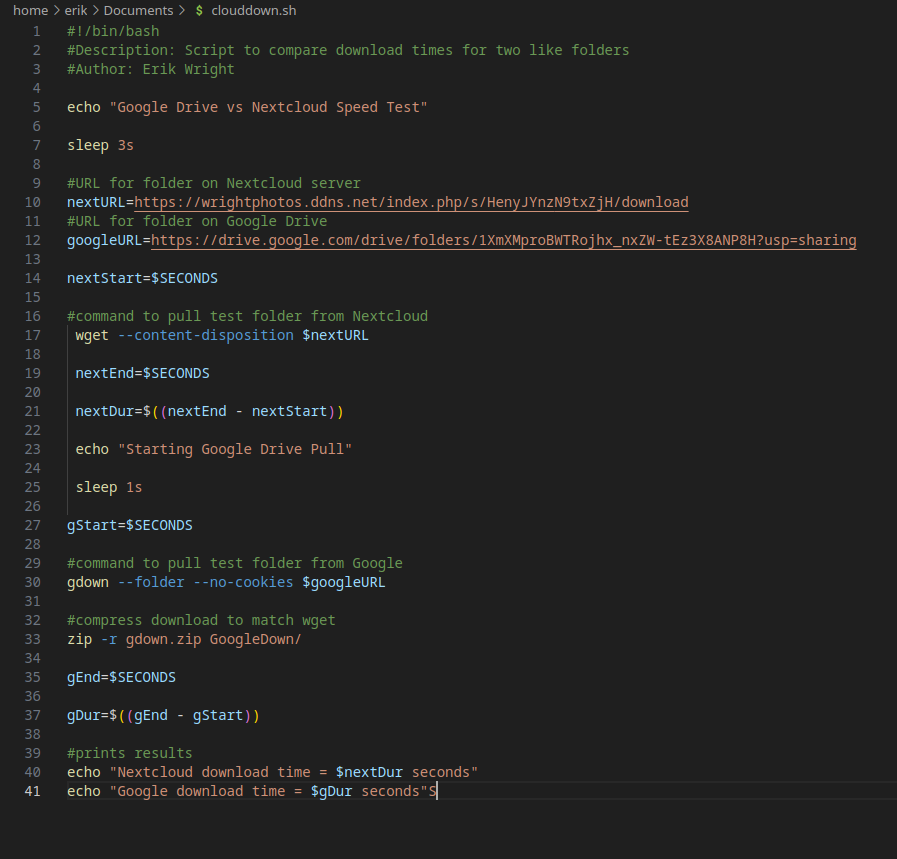
Did you know that using a locally hosted cloud service not only saves you money, but also time? To illustrate this point, I conducted a download speed test between my Nextcloud server and Google Drive. The test involved a 3.8 GB folder containing a mix of small text files and large video files. Using a script (depicted in Figure 2) to download the folder from both services, I tested the speeds from various locations to compare their performance in different network environments. After running the test five times for each service and averaging the results, I discovered something interesting. On my home network, the locally hosted solution was more than twice as fast as Google Drive. However, when testing from my workplace’s free Wi-Fi or a hotspot, the download times were comparable between the two. Surprisingly, when I tested from school, Google Drive was twice as fast as the locally hosted solution. Figure 3 shows the results of the tests.
Data Control and Security
By hosting your own cloud services, you will have complete control over your data. This means you will no longer have to worry about your favorite show moving from one streaming service to another, or about the quality of your photos degrading when backed up to platforms like Google Photos, which by default lower the quality of uploaded photos. Additionally, you can rest easy knowing that you are solely responsible for and have full control over the security practices taken to protect your data. You won’t have to worry about the cloud service leaking your account credentials or whether their servers are patched. However, it’s important to note that becoming your own cloud service provider comes with a lot of responsibility. While we’ve covered the general benefits, it’s also important to consider the drawbacks of hosting locally.
Drawbacks to Local Cloud Computing
Security Threats
As the character, Ben Parker once said, “… with great power comes great responsibility.” This is especially true when it comes to owning your data – it is your responsibility to keep it safe. So, how strong are your cybersecurity practices? Can you detect if your network or device has been compromised? According to a study by the Pew Research Center, “What the Public Knows About Cybersecurity,” the answer is likely no. Shockingly, less than one percent of participants were able to correctly answer all of the questions, and only twenty percent got more than half correct. While many could identify strong passwords and suspicious links, they struggled with more technical topics. For example, most were unaware that their internet service provider could view all of their internet activity or that hackers could target their home network with Direct Denial of Service (DDoS) attacks using botnets that span the globe. Unfortunately, even home networks are not immune to attacks from enemy nation-states. In January of 2024, over a thousand home networks were infected by spyware from the Russian hacker group Fancy Bear (Purdy, 2024). Once again, we need to consider whether the advantages of the service surpass the potential risks associated with it. Outside of the intricate nature of data protection and cybersecurity, there exist other obstacles to entry that we will delve into in the following section.
Complexity
Computers while widely used are often not well understood. When was the last time you opened a computer, and could you point out the components of a computer? While there are many step-by-step guides on how to assemble a computer it can still be frustrating. Case in point I, nearing on a decade of computer building knowledge, failed to install a RAM stick on my server correctly. What was supposed to be a simple five-minute upgrade turned into a two-hour troubleshooting session while researching why RAM would cause the server to not post. However, let’s say you can overcome the hurdle of making sure a server is built correctly and posts the next barrier would be setting up the operating system.
Assuming you were able to build a functional computer and everything boots up, would you be able to install an operating system? In my experience, most people don’t know how to install an operating system. Even if you manage to set up the operating system, you will have to research and set up the services you need. Personally, I often struggle with configuring and deploying new services or maintaining them. For example, I failed to set up a backup for my Nextcloud server and, when a bad configuration was pushed by an update, I lost all of my server settings, having to reset everything from scratch! On top of that, I can spend hours looking through documentation and unhelpful Stack Overflow posts and still not find a solution to an issue I am having. It takes a lot of hard work and dedication to maintain these services, and locally hosting, even for me, can often be too technical to understand.
All of these complexities can make it seem like it’s not worth your time. However, if you can overcome these hurdles, it can be one of the most rewarding experiences. I encourage you to give it a try as well.
Conclusion
As we come to the end of this post, I hope that you understand the importance of cloud services in our daily lives. We have discussed how cloud services work, their impact on our finances and the environment, and how we can potentially address some of these issues by decentralizing cloud services through local hosting. While local hosting may be challenging and require several hours of tedious work, I hope you see it as a viable option that you can pursue in your spare time to save not only the green in your wallet but also the green on our planet. Therefore, the next time you encounter a Netflix price hike or Google discontinues your favorite cloud service, consider visiting your local Goodwill or parts shop to deploy your home-grown cloud solution and become digitally independent. By doing so, you can contribute to reducing the environmental impact of cloud computing.
Citations
Alkhatib, A., Al Sabbagh, A., & Maraqa, R. (2021). Pubic cloud computing: Big three vendors. 2021 International Conference on Information Technology (ICIT). https://doi.org/10.1109/icit52682.2021.9491680
Bernsen, R. (2021, September 21). Why to self-host your software? should you go for on-premises or cloud?. OpenProject.org. https://www.openproject.org/blog/why-self-hosting-software/
Capoot, A. (2023, July 24). Spotify increases prices for its premium subscription plans. CNBC. https://www.cnbc.com/2023/07/24/spotify-increases-prices-for-its-premium-subscription-plans.html
Crane, E. (2023, June 15). Amazon shuts down customer’s smart home devices after delivery driver’s false racism claim. New York Post. https://nypost.com/2023/06/15/amazon-shuts-down-customers-smart-home-devices-over-false-racist-claim/
Dias, J. (2023, December 26). Experts suggest taking stock of how much your monthly subscriptions really cost before the end of the Year. CBS News. https://www.cbsnews.com/newyork/news/experts-suggest-taking-stock-of-how-much-your-monthly-subscriptions-really-cost-before-the-end-of-the-year/
DigitalOcean. (2024). What is cloud scalability?. What is Cloud Scalability? https://www.digitalocean.com/resources/article/cloud-scalability
DLS (Ed.). (2024, March 12). News release bureau of labor statistics.
Fellah, H., Mezioud, C., & Batouche, M. C. (2020). Mobile cloud computing. Proceedings of the 3rd International Conference on Networking, Information Systems & Security. https://doi.org/10.1145/3386723.3387880
Google. (2024). What is cloud architecture? benefits & components | google cloud. Google. https://cloud.google.com/learn/what-is-cloud-architecture#:~:text=Cloud%20architecture%20refers%20to%20how,to%20create%20cloud%20computing%20environments.
Grinberg, E., & Chavez, N. (2018, August 30). Connecticut man sentenced in Celebrity Photo Hacking scandal. CNN. https://edition.cnn.com/2018/08/29/entertainment/celebrity-photo-hacking-sentence/index.html
Hassan, K., Kaur, P., & Vijayasingam, V. (2023). E-waste—study of environmental impacts and waste management practices. 2023 International Conference on Integrated Intelligence and Communication Systems (ICIICS). https://doi.org/10.1109/iciics59993.2023.10421364
Kevin Purdy – Feb 16, 2024 4:37 pm UTC. (2024, February 16). DOJ quietly removed Russian malware from routers in US homes and businesses. Ars Technica. https://arstechnica.com/information-technology/2024/02/doj-turns-tables-on-russian-hackers-uses-their-malware-to-wipe-out-botnet/#:~:text=More%20than%201%2C000%20Ubiquiti%20routers,according%20to%20the%20Justice%20Department.
Lee, W., & Lauder, T. (2023, October 11). The cheap streaming era is over. here’s why your bills are going up. Los Angeles Times. https://www.latimes.com/entertainment-arts/business/story/2023-10-11/streaming-pricier-consumers-netflix-spotify-sag-aftra-strike#:~:text=Media%20companies%20are%20charging%20more%20as%20they%20struggle,are%20grappling%20with%20inflation%20and%20broader%20economic%20uncertainty.
Lindner, J. (2023, December 16). Must-know internet traffic statistics [latest report] • Gitnux. GITNUX. https://gitnux.org/internet-traffic-statistics/
Monserrate, S. G. (2022, February 22). The staggering ecological impacts of computation and the cloud. The MIT Press Reader. https://thereader.mitpress.mit.edu/the-staggering-ecological-impacts-of-computation-and-the-cloud/
Monteclaro, A. J. (2023, November 2). Server room power consumption: Demand and efficiency. ServerWatch. https://www.serverwatch.com/servers/server-room-power-consumption/
Office of ENERGY EFFICIENCY & RENEWABLE ENERGY. (2024). Data Centers and servers. Energy.gov. https://www.energy.gov/eere/buildings/data-centers-and-servers
Roth, E. (2022, November 29). This is why streaming Netflix, Disney Plus, and HBO Max keeps getting more expensive. The Verge. https://www.theverge.com/23460947/netflix-hulu-disney-plus-apple-tv-streaming-price-hikes-truth-behind
Stanford (Ed.). (2023, December 5). Global carbon emissions from fossil fuels reached record high in 2023. Stanford Doerr School of Sustainability. https://sustainability.stanford.edu/news/global-carbon-emissions-fossil-fuels-reached-record-high-2023
Statista. (2023, September 7). Distribution of electricity generation worldwide in 2022, by energy source. Retrieved March 30, 2024,.
Strum, L., & Cooney, D. (2017, September 13). Affected by the equifax hack? here’s what to do now. PBS. https://www.pbs.org/newshour/nation/affected-equifax-hack-heres-now
Susnjara, S., & Smalley, I. (2024, February 14). What is cloud computing?. IBM. https://www.ibm.com/topics/cloud-computing